
 DUKE
DUKE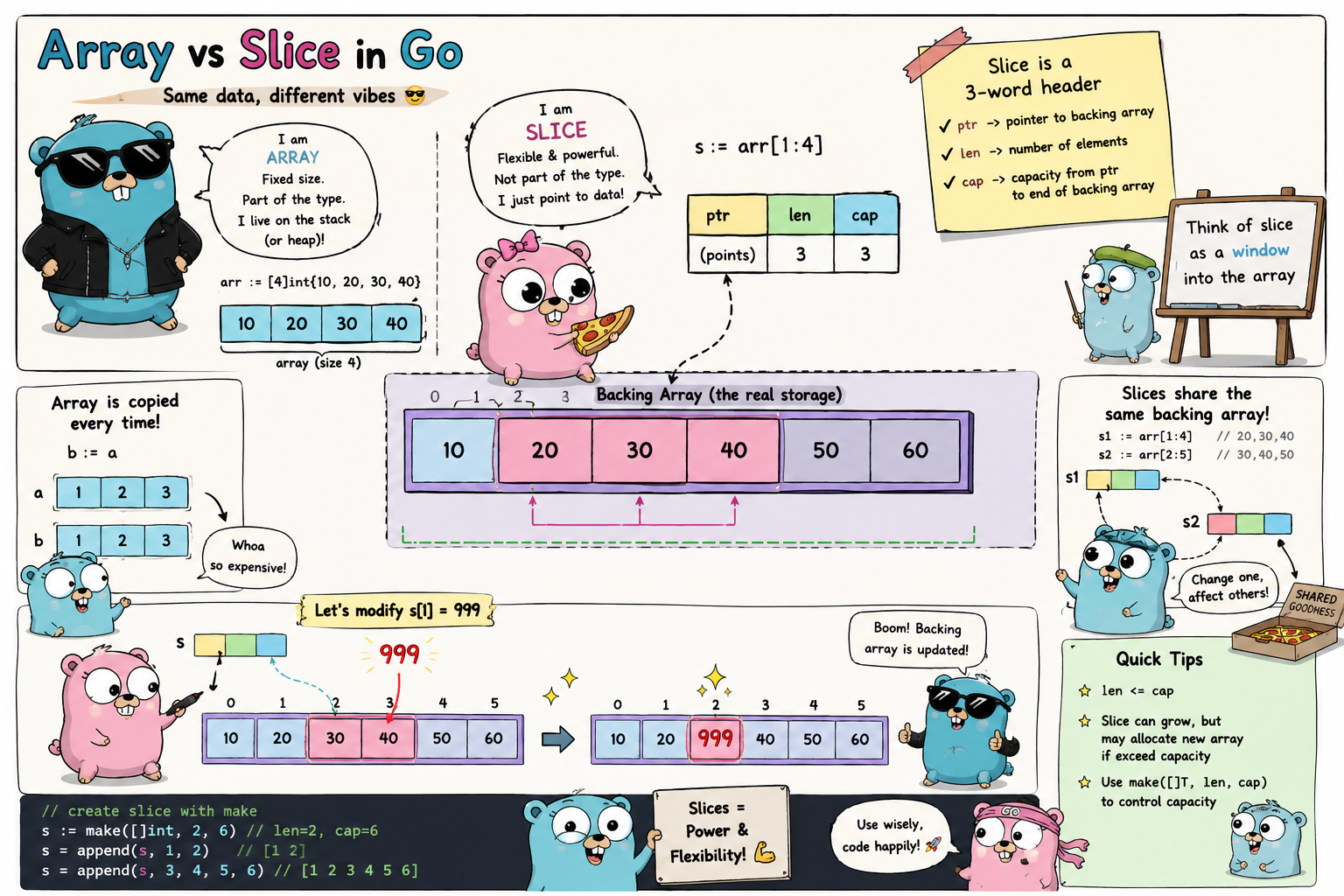
Arrays and slices are two fundamental data structures used to store collections of values of the same type in Go.
An array has a fixed size, follows value semantics, and is useful when the number of elements is known in advance. A slice is more flexible, can change its length, and is the structure used in most real-world Go programs.
However, a slice is not simply a “resizable array.” To use slices safely, we need to understand:
- How a slice is represented in memory
- The difference between length and capacity
- When multiple slices share the same underlying array
- When
appendallocates a new array - Why modifying one slice can unexpectedly affect other data
- How to prevent aliasing and avoid retaining unnecessarily large memory regions
Arrays
An array is a fixed-size collection of elements of the same type, accessed through indexes.
The syntax for declaring an array is:
var name [length]Type
For example:
func main() {
	var arr [4]int

	fmt.Println(arr)
}
Output:
$ go run main.go
[0 0 0 0]
Even though we have not assigned a value to any element, the array already contains four zeros.
This happens because every variable in Go is initialized with the zero value of its type:
0for numeric types""for stringsfalsefor booleansnilfor pointers, slices, maps, functions, channels, and interfaces
An array is therefore fully initialized as soon as it is declared.
Initializing an array with a literal
When the elements are known in advance, we can use an array literal:
var arr = [4]int{1, 2, 3, 4}
Or the short variable declaration syntax:
arr := [4]int{1, 2, 3, 4}
Each element is accessed by its index:
fmt.Println(arr[0]) // 1
fmt.Println(arr[3]) // 4
Array indexes start at 0 and end at len(arr) - 1
For an array with a length of 4, the valid indexes are:
0, 1, 2, 3Letting the compiler infer the length
When you do not want to count the elements manually, you can use [...]:
arr := [...]int{1, 2, 3, 4}The compiler infers that the type of arr is [4]int
In this context, ... only tells the compiler to determine the length from the literal. The result is still a fixed-size array.
Iterating over an array
You can iterate over an array using a traditional for loop:
func main() {
	arr := [4]int{1, 2, 3, 4}

	for i := 0; i < len(arr); i++ {
		fmt.Printf("Index: %d, Element: %d\n", i, arr[i])
	}
}
However, the more idiomatic approach in Go is to use range:
func main() {
	arr := [4]int{1, 2, 3, 4}

	for i, element := range arr {
		fmt.Printf("Index: %d, Element: %d\n", i, element)
	}
}
Output:
$ go run main.go
Index: 0, Element: 1
Index: 1, Element: 2
Index: 2, Element: 3
Index: 3, Element: 4
On each iteration, range produces two values:
- The current index
- A copy of the element at that index
Depending on what you need, range can be used in several forms:
for i, element := range arr {
	// Use both the index and the element
}
for _, element := range arr {
	// Use only the element
}
for i := range arr {
	// Use only the index
}
for range arr {
	// Repeat len(arr) times without retrieving either value
}
The blank identifier _ is used when the index is not needed but the element still is.
Multidimensional arrays
Each array in Go is technically one-dimensional. However, an array element can itself be another array.
This allows us to construct multidimensional arrays:
func main() {
	arr := [2][4]int{
		{1, 2, 3, 4},
		{5, 6, 7, 8},
	}

	fmt.Println(arr)
}
Output:
$ go run main.go
[[1 2 3 4] [5 6 7 8]]
The type [2][4]int can be understood as:
- An outer array containing
2elements - Each element is an array of type
[4]int
You can access an element using two indexes:
fmt.Println(arr[0][0]) // 1
fmt.Println(arr[1][2]) // 7
Important properties of arrays
Three properties define how arrays behave in Go.
1. The length is part of the type
In Go, [4]int and [2]int are two different types.
var a [4]int
var b [2]int
Although both arrays contain int elements, they cannot be used interchangeably:
a = b // Compile error
This also affects function parameters:
func process(values [4]int) {
	// ...
}
This function accepts exactly a [4]int. Values of type [3]int or [5]int are not valid arguments.
2. An array cannot change its size
Once an array has been declared, its length cannot change.
arr := [4]int{1, 2, 3, 4}
arr will always contain exactly four element positions. You cannot add a fifth position or shrink it to three.
This is one of the main reasons slices are more common in application code.
3. An array is a value type
Arrays follow value semantics. Assigning an array to another variable copies every element into a new array value.
func main() {
	a := [7]string{
		"Mon",
		"Tue",
		"Wed",
		"Thu",
		"Fri",
		"Sat",
		"Sun",
	}

	b := a
	b[0] = "Monday"

	fmt.Println(a)
	fmt.Println(b)
}
Output:
$ go run main.go
[Mon Tue Wed Thu Fri Sat Sun]
[Monday Tue Wed Thu Fri Sat Sun]
The assignment b := a creates a complete copy of a.
After the assignment, a and b are independent arrays. Modifying b[0] does not affect a[0].
The same rule applies when an array is passed to a function:
func change(arr [3]int) {
	arr[0] = 100
}

func main() {
	values := [3]int{1, 2, 3}

	change(values)

	fmt.Println(values) // [1 2 3]
}
The parameter arr is a copy of values, so changes made inside the function do not affect the original array.
For a large array, copying every element can be expensive. In practice, we normally pass a slice or a pointer to an array instead of passing a large array by value.
Slices
The fixed size of an array makes it unsuitable for many real-world situations.
For example, we may not know in advance:
- How many records an API will return
- How many values a user will provide
- How many rows a database query will return
- How many chunks a file will be divided into
For these situations, Go provides slices.
A slice can be understood as a window or view over a region of data stored in an underlying array.
For example:
a := [5]int{20, 15, 5, 30, 25}
s := a[1:4]
The slice s does not copy three elements from a. Instead, it refers to a region inside a.
Array:  [20 15 5 30 25]
Index:    0  1 2  3  4
             └─────┘
              Slice
The contents visible through s are: []int{15, 5, 30}
The slice header
Conceptually, a slice contains three fields:
Pointer
Length
Capacity
A slice header can be visualized like this:
type sliceHeader struct {
	Data unsafe.Pointer
	Len  int
	Cap  int
}
This is only a conceptual model for understanding slice behavior. Normal application code should not manipulate this internal representation directly.
The three components have the following meanings.
Pointer
The pointer refers to the first element of the slice in the underlying array.
Length
The length is the number of elements that can currently be accessed through the slice.
It is obtained with:
len(s)Capacity
The capacity is the maximum number of elements the slice can grow to, measured from the beginning of the slice to the end of the underlying array.
It is obtained with:
cap(s)A slice is not a reference type in the traditional sense
Slices are often described as reference types because multiple slices can observe changes to the same region of data.
A more precise description is:
A slice is a small header value containing a pointer, a length, and a capacity. That header is copied by value, just like every other value in Go.
When a slice is copied:
s2 := s1
Go copies the slice header, not all the elements.
After the assignment:
s1ands2have independent length fieldss1ands2have independent capacity fields- Both headers may point to the same underlying array
Because they may point to the same array, modifications to elements through one slice can be observed through the other.
Fact, after the assignment s2 := s1, both slices point to the same underlying array. If an append operation exceeds the capacity of s2, Go allocates a new underlying array for the returned slice. At that point, s1 and s2 no longer share the same data. However, if there is still sufficient capacity, append may continue using the existing underlying array, meaning changes made through either slice may still affect the other.
Length and capacity
Consider the following example:
func main() {
	a := [5]int{20, 15, 5, 30, 25}

	s := a[1:4]

	fmt.Println("Array:", a, "len:", len(a), "cap:", cap(a))
	fmt.Println("Slice:", s, "len:", len(s), "cap:", cap(s))
}
Output:
$ go run main.go
Array: [20 15 5 30 25] len: 5 cap: 5
Slice: [15 5 30] len: 3 cap: 4
The slice is created using:
s := a[1:4]
The general form of a slice expression is:
a[low:high]
Where:
lowis the starting index and is includedhighis the ending index and is excluded
Therefore a[1:4] contains a[1], a[2], a[3]
The length is calculated as:
high - low
4 - 1 = 3
The capacity is measured from low to the end of the underlying array:
len(a) - low
5 - 1 = 4
Although s currently exposes only three elements, it can grow by one additional element toward the end of the array without requiring a new allocation.
Declaring and initializing slices
A slice type looks like an array type without a declared length:
[]TFor example:
[]int
[]string
[]User
There are several ways to create a slice.
The zero value of a slice
When a slice is declared without initialization, its value is nil:
func main() {
	var s []string

	fmt.Println(s)
	fmt.Println(s == nil)
	fmt.Println(len(s))
	fmt.Println(cap(s))
}
Output:
[]
true
0
0
A nil slice has the following properties:
- It has no underlying array
- Its length is
0 - Its capacity is
0 - It can be used with
range - It can be passed to
append - It can be compared with
nil
For example:
var s []int

s = append(s, 10, 20, 30)

fmt.Println(s) // [10 20 30]
append works safely with a nil slice.
Creating a slice with a literal
A slice literal looks like an array literal without a length:
s := []string{"a", "b", "c"}
Here, Go creates an underlying array containing three elements and returns a slice that refers to the whole array.
Typically:
len(s) == 3
cap(s) == 3
Creating a slice with make
The built-in make function can be used to create a slice:
s := make([]string, 4)
The complete syntax is:
make([]T, length, capacity)For example:
s := make([]string, 4, 8)
In this case:
len(s) == 4
cap(s) == 8
Go allocates an underlying array with room for eight elements, but the initial slice length is only four.
The four existing elements contain their zero values.
fmt.Println(s) // [ ]
For []string, every element initially contains an empty string.
When capacity is omitted, it defaults to the length:
s := make([]int, 4)
This has the same length and capacity as:
s := make([]int, 4, 4)
Length is not the number of elements you plan to append
A common mistake is to use a non-zero length when the actual intention is only to reserve capacity:
s := make([]int, 3)

s = append(s, 1, 2, 3)

fmt.Println(s)
Output:
[0 0 0 1 2 3]make([]int, 3) has already created a slice containing three zero-valued elements. append then adds another three elements after them.
To create an empty slice while reserving space for three elements, write:
s := make([]int, 0, 3)

s = append(s, 1, 2, 3)

fmt.Println(s) // [1 2 3]
Creating a slice from an array or another slice
A slice can be created from an array:
a := [5]int{20, 15, 5, 30, 25}

s1 := a[1:4] // [15 5 30]
s2 := a[:3]  // [20 15 5]
s3 := a[2:]  // [5 30 25]
s4 := a[:]   // [20 15 5 30 25]
The shortened form:
a[:high]is equivalent to: a[0:high]
a[low:] is equivalent to: a[low:len(a)]
A slice can also be sliced again:
s1 := a[1:4]  // [15 5 30]
s2 := s1[1:2] // [5]
In this case, s2, s1, and a may all share the same underlying array.
Slices share underlying arrays
Because a slice is only a view over an underlying array, modifying an element through the slice modifies the data in that array.
func main() {
	a := [7]string{
		"Mon",
		"Tue",
		"Wed",
		"Thu",
		"Fri",
		"Sat",
		"Sun",
	}

	s := a[0:2]
	s[0] = "Sunday"

	fmt.Println(a)
	fmt.Println(s)
}
Output:
$ go run main.go
[Sunday Tue Wed Thu Fri Sat Sun]
[Sunday Tue]
The assignment:
s[0] = "Sunday"writes directly to a[0] in the underlying array.
This is fundamentally different from array assignment:
b := aArray assignment copies all elements, while slicing only creates a new slice header that refers to existing data.
Assigning a slice does not copy its elements
Consider the following example:
func main() {
	s1 := []int{1, 2, 3}
	s2 := s1

	s2[0] = 100

	fmt.Println(s1)
	fmt.Println(s2)
}
Output:
[100 2 3]
[100 2 3]
The assignment:
s2 := s1copies only the slice header.
Both s1 and s2 still refer to the same underlying array. Therefore, modifying an element through s2 is also visible through s1.
However, the two slice headers remain independent.
For example:
func main() {
	s1 := []int{1, 2, 3}
	s2 := s1

	s2 = s2[:2]

	fmt.Println(s1) // [1 2 3]
	fmt.Println(s2) // [1 2]
}
Changing the length of s2 does not change the length of s1, because each slice header stores its own length.
The copy function
The built-in copy function copies elements from one slice into another:
copy(destination, source)
It returns the number of elements actually copied.
The number of copied elements is the smaller of:
len(destination)and:
len(source)For example:
func main() {
	s1 := []string{"a", "b", "c", "d"}
	s2 := make([]string, len(s1))

	count := copy(s2, s1)

	fmt.Println("Copied", count, "elements")
	fmt.Println(s2)
}
Output:
$ go run main.go
Copied 4 elements
[a b c d]
Because s2 was created with make, it has its own underlying array.
After copy, the two slices contain the same values but no longer share their data:
s2[0] = "changed"

fmt.Println(s1) // [a b c d]
fmt.Println(s2) // [changed b c d]
The destination must have sufficient length
copy can write only into elements that already exist in the destination slice.
The following example copies nothing:
source := []int{1, 2, 3}
destination := make([]int, 0, 3)

count := copy(destination, source)

fmt.Println(count)       // 0
fmt.Println(destination) // []
Although the destination has a capacity of 3, its length is still 0.
To copy three elements, the destination needs a length of 3:
destination := make([]int, len(source))
copy(destination, source)
Alternatively, use append:
destination := append([]int(nil), source...)
The append function
The built-in append function adds one or more elements to the end of a slice:
s = append(s, value)
Or:
s = append(s, value1, value2, value3)
For example:
func main() {
	s := []string{"a", "b"}

	s = append(s, "c", "d")

	fmt.Println(s)
}
Output:
[a b c d]The most important rule is:
appendreturns a new slice header, and that returned value must always be used.
append when there is enough capacity
If the underlying array still has available capacity, append writes the new element directly into the existing array.
For example:
func main() {
	s := make([]int, 2, 4)

	s[0] = 10
	s[1] = 20

	fmt.Println(len(s), cap(s)) // 2 4

	s = append(s, 30)

	fmt.Println(s)              // [10 20 30]
	fmt.Println(len(s), cap(s)) // 3 4
}
The underlying array has room for four elements, while the slice initially uses only two positions.
Therefore, append can add 30 without allocating a new array.
append when capacity is insufficient
When the current capacity is not large enough, Go generally performs these steps:
- Allocates a larger underlying array
- Copies the existing elements into the new array
- Adds the new elements
- Returns a slice header that points to the new array
For example:
func main() {
	s1 := []string{"a", "b", "c", "d"}

	s2 := append(s1, "e", "f")

	fmt.Println(s1)
	fmt.Println(s2)
}
Output:
$ go run main.go
[a b c d]
[a b c d e f]
In this example:
len(s1) == 4
cap(s1) == 4
The underlying array has no remaining space, so append must allocate a new array for s2.
Afterward:
s1still refers to the old arrays2refers to the new array- The slices no longer share the same underlying array
Always assign the result of append
The correct pattern is:
s = append(s, 4)
Do not think of append as directly modifying the caller’s original slice header.
For example:
func grow(s []int) {
	s = append(s, 4)
}

func main() {
	values := []int{1, 2, 3}

	grow(values)

	fmt.Println(values) // [1 2 3]
}
When values is passed to grow, its slice header is copied by value.
Inside the function:
s = append(s, 4)
updates only the local variable s. The slice header stored in values outside the function is not updated.
To let the caller receive the new slice, the function should return it:
func grow(s []int) []int {
	return append(s, 4)
}

func main() {
	values := []int{1, 2, 3}

	values = grow(values)

	fmt.Println(values) // [1 2 3 4]
}
Another option is to pass a pointer to the slice, but returning the new slice is simpler and more idiomatic in most cases.
Slices and variadic functions
A variadic function can receive a variable number of arguments.
For example:
func add(values ...int) int {
	sum := 0

	for _, value := range values {
		sum += value
	}

	return sum
}
It can be called with individual arguments:
fmt.Println(add(1, 2, 3)) // 6
Inside the function, values has the type:
[]intWhen a slice already exists, the ... operator expands it into individual arguments:
func main() {
	values := []int{1, 2, 3}

	fmt.Println(add(values...)) // 6
}
Without ..., the compiler reports an error because []int is one slice value, while the function expects a variable number of individual int arguments.
How append grows capacity
If every added element required allocating a new array that was exactly one position larger, building a large slice would be extremely expensive.
For example, adding n elements would repeatedly copy:
1 element
2 elements
3 elements
4 elements
...
n elements
The total number of copied elements could grow quadratically.
To avoid this, the Go runtime increases capacity in larger steps.
For small slices, capacity usually grows quickly and may approximately double. As slices become larger, the growth rate gradually decreases to balance two goals:
- Reducing the number of reallocations
- Avoiding excessive unused memory
The exact growth strategy is an implementation detail and may change between Go versions. Code should therefore never depend on a specific capacity growth factor.
What we can rely on is:
appendhas amortized constant-time complexity.
Most calls to append simply write into already allocated memory. Occasionally, one call must allocate a new array and copy the existing elements, but that cost is spread across many inexpensive append operations.
The classic append aliasing bug
One of the most subtle slice bugs appears when multiple slices share the same underlying array.
Consider this example:
func main() {
	a := []int{1, 2, 3, 4, 5}

	s1 := a[0:2]
	s2 := append(s1, 99)

	fmt.Println(a)
	fmt.Println(s1)
	fmt.Println(s2)
}
Output:
$ go run main.go
[1 2 99 4 5]
[1 2]
[1 2 99]
You might expect append to produce:
[1 2 99]without modifying a.
However, s1 has:
len(s1) == 2
cap(s1) == 5
It begins at the first element of a and still has enough capacity to grow to the end of the underlying array.
Because capacity is available, this call:
append(s1, 99)does not allocate a new array. Instead, it writes 99 directly into the next position of the existing underlying array:
a[2] = 99The original value 3 is overwritten.
The dangerous part is that the behavior of append depends on the capacity at runtime:
- If capacity is available, it may reuse the existing array
- If capacity is insufficient, it allocates a new array
As a result, the same pattern may share data in one situation but become independent in another.
Full slice expressions
Go provides a three-index slice expression:
a[low:high:max]Where:
- Length is
high - low - Capacity is
max - low
For example:
a := []int{1, 2, 3, 4, 5}

s := a[0:2:2]

fmt.Println(len(s)) // 2
fmt.Println(cap(s)) // 2
Because the length and capacity are both 2, the slice cannot grow within the current underlying array.
If we call:
s2 := append(s, 99)
append is forced to allocate a new array:
func main() {
	a := []int{1, 2, 3, 4, 5}

	s1 := a[0:2:2]
	s2 := append(s1, 99)

	fmt.Println(a)
	fmt.Println(s1)
	fmt.Println(s2)
}
Output:
[1 2 3 4 5]
[1 2]
[1 2 99]
The underlying array used by a remains unchanged.
A full slice expression is especially useful when returning or passing a sub-slice to other code while preventing that code from using append to overwrite data beyond the visible slice.
For example:
func firstTwo(values []int) []int {
	return values[:2:2]
}
The receiving code can still modify the two visible elements because they continue to share the underlying array:
result[0] = 100
However, if it appends another element, the runtime must allocate a new array.
To isolate the data completely, a real copy is still required.
Creating an independent slice
Both slice assignment and slicing preserve access to the same underlying array.
s2 := s1And:
s2 := s1[:]may both result in two slices that share the same data.
To create an independent copy, use make with copy:
func clone(source []int) []int {
	result := make([]int, len(source))
	copy(result, source)

	return result
}
Usage:
func main() {
	s1 := []int{1, 2, 3}
	s2 := clone(s1)

	s2[0] = 100

	fmt.Println(s1) // [1 2 3]
	fmt.Println(s2) // [100 2 3]
}
A shorter form is:
s2 := append([]int(nil), s1...)
Since Go 1.21, the slices package also provides:
s2 := slices.Clone(s1)
Nil slices and empty slices
A nil slice and an empty slice both have a length of 0, but they are not exactly the same value.
var a []int
b := []int{}
c := make([]int, 0)
Checks:
fmt.Println(a == nil) // true
fmt.Println(b == nil) // false
fmt.Println(c == nil) // false
All three behave the same way for many operations:
len(a) // 0
len(b) // 0

cap(a) // 0
cap(b) // 0
They can safely be ranged over:
for range a {
	// The loop body never runs
}
They can also safely be appended to:
a = append(a, 1)
b = append(b, 1)
The difference often becomes important at serialization boundaries.
For example, with JSON:
package main

import (
	"encoding/json"
	"fmt"
)

func main() {
	var a []int
	b := []int{}

	jsonA, _ := json.Marshal(a)
	jsonB, _ := json.Marshal(b)

	fmt.Println(string(jsonA))
	fmt.Println(string(jsonB))
}
Output:
null
[]
A nil slice is encoded as:
nullAn empty non-nil slice is encoded as:
[]If an API contract requires a JSON array even when no elements exist, the field must be initialized as an empty slice rather than left as nil.
Inside application code, a nil slice is often the natural choice because it requires no allocation and still works with len, range, and append.
The distinction between nil and empty slices should usually matter only where the difference is observable, such as:
- JSON responses
- Database drivers
- Reflection
- API contracts
- Logic that distinguishes uninitialized state
A small slice can retain a very large underlying array
A small slice can keep its entire underlying array alive in memory.
For example:
func firstTwo(huge []byte) []byte {
	return huge[:2]
}
Suppose huge refers to an underlying array of 100 MB.
Although the function returns only two bytes, the returned slice still points into that 100 MB array. The garbage collector cannot reclaim the array while the two-byte slice remains reachable.
Conceptually:
Underlying array: 100 MB
┌──────────────────────────────────────────────┐
│ 2 bytes in use │ 99.999... MB unused        │
└──────────────────────────────────────────────┘
  ↑
  The small slice still references the whole array
This is not a memory leak in the strict sense because the memory still has a valid reference. However, the program is retaining far more memory than it actually needs.
To avoid this, copy the small region into a new array:
func firstTwoCopy(huge []byte) []byte {
	result := make([]byte, 2)
	copy(result, huge[:2])

	return result
}
After the function returns, if no other reference to huge exists, the large underlying array can be reclaimed by the garbage collector.
Another way to write it is:
func firstTwoCopy(huge []byte) []byte {
	return append([]byte(nil), huge[:2]...)
}
This pattern is especially important when processing:
- Large files
- HTTP response bodies
- Network buffers
- Data parsed from large blocks
- Byte sequences retrieved from a cache
- Large batches from which only a small portion must be retained
The slices package in the standard library
Since Go 1.21, the standard library has included the generic slices package.
For example:
package main

import (
	"fmt"
	"slices"
)

func main() {
	values := []int{3, 1, 2}

	slices.Sort(values)

	fmt.Println(values)
	fmt.Println(slices.Contains(values, 2))
}
Output:
[1 2 3]
true
Some commonly used functions include the following.
Clone
cloned := slices.Clone(values)
Creates a new slice backed by an independent underlying array.
Contains
exists := slices.Contains(values, 10)
Checks whether an element exists.
Index
index := slices.Index(values, 10)
Returns the first index of the element, or -1 if it is not found.
Equal
equal := slices.Equal(a, b)
Compares two slices element by element.
This is necessary because slices cannot be compared directly using ==, except when comparing a slice with nil.
a == b // Compile error
Reverse
slices.Reverse(values)
Reverses the elements in place.
Sort
slices.Sort(values)
Sorts a slice whose element type has an ordering.
Delete
values = slices.Delete(values, start, end)
Removes the elements in the range [start:end).
The slices package makes code clearer and reduces the need to repeatedly implement common loops.
Common mistakes with arrays and slices
1. Index out of range
Accessing an index outside the current length is an error.
For an array with a constant index, the compiler can usually detect the problem immediately:
arr := [3]int{1, 2, 3}

fmt.Println(arr[3])
Error:
invalid argument: index 3 out of bounds [0:3]When the index is determined at runtime:
s := []int{1, 2, 3}
i := 3

fmt.Println(s[i])
the program panics:
panic: runtime error: index out of range [3] with length 3A valid index always satisfies:
0 <= index < len(collection)2. Forgetting that array assignment creates a copy
a := [3]int{1, 2, 3}
b := a

b[0] = 100

fmt.Println(a) // [1 2 3]
fmt.Println(b) // [100 2 3]
b is an independent array.
To modify the original array through a function, you can pass a pointer:
func change(values *[3]int) {
	values[0] = 100
}
However, slices are usually more convenient in application code.
3. Forgetting that slice assignment shares data
s1 := []int{1, 2, 3}
s2 := s1

s2[0] = 100

fmt.Println(s1) // [100 2 3]
fmt.Println(s2) // [100 2 3]
The slice headers are different values, but they point to the same underlying array.
When independent data is required, clone the slice:
s2 := slices.Clone(s1)Or:
s2 := make([]int, len(s1))
copy(s2, s1)
4. Forgetting to assign the result of append
Incorrect in terms of intended behavior:
func grow(s []int) {
	s = append(s, 4)
}
The variable s is only a local copy of the slice header.
A correct design is:
func grow(s []int) []int {
	return append(s, 4)
}
And at the call site:
s = grow(s)The rule to remember is:
s = append(s, value)5. Confusing length with capacity
s := make([]int, 5)This creates a slice that already contains five elements:
[0 0 0 0 0]It does not create an empty slice with space reserved for five future elements.
To create an empty slice with preallocated capacity:
s := make([]int, 0, 5)6. Depending on an exact capacity growth strategy
Business logic should not depend on the runtime increasing capacity by a specific amount.
For example, do not assume:
newCap == oldCap * 2The capacity growth strategy is an implementation detail that may vary depending on:
- The Go version
- The size of the element type
- The current capacity
- The number of elements being appended
- The runtime allocator’s size-class rounding rules
Capacity should be treated as an optimization and aliasing-control mechanism, not as part of business logic.
7. Returning a sub-slice of a large buffer
func extract(data []byte) []byte {
	return data[:10]
}
If data is very large and the result is retained for a long time, the entire underlying array remains alive.
When a small portion must be stored long-term, copy it:
func extract(data []byte) []byte {
	result := make([]byte, 10)
	copy(result, data[:10])

	return result
}
When should you use an array?
Slices are more common in ordinary Go code, but arrays are still useful in several situations.
The size is part of the meaning of the data
For example:
type IPv4 [4]byteOr:
type RGB [3]uint8The fixed length allows the compiler to guarantee that the structure always contains the expected number of elements.
You need comparison with ==
Arrays can be compared when their element type is comparable:
a := [3]int{1, 2, 3}
b := [3]int{1, 2, 3}

fmt.Println(a == b) // true
Slices do not support direct comparison.
You need to use the value as a map key
An array can be used as a map key when its element type is comparable:
cache := map[[16]byte]string{}A slice cannot be used as a map key because slices are not comparable.
The data is small and has a fixed size
Arrays may be appropriate for:
- Hash values
- UUIDs represented as bytes
- Fixed-size vectors
- Small fixed-size matrices
- Compile-time-sized buffers
- Fixed-layout protocol fields
When should you use a slice?
Slices are the default choice for most collections in Go:
[]User
[]Order
[]string
[]byte
Slices are appropriate when:
- The number of elements can change
- You need
append - You need to pass a collection into a function
- You need to return results from a database or API
- You need to work with a region inside an array or buffer
- You want to avoid copying an entire array when passing data between functions
However, because slices may share underlying arrays, ownership must be clear:
- Who is allowed to modify the elements?
- Who is allowed to append?
- Will the slice be stored for a long time?
- Should the data be cloned before being given to other code?
- Is a small sub-slice unintentionally keeping a large buffer alive?
Understanding ownership is more important than memorizing syntax.
The mental model to remember
When working with arrays and slices, keep the following model in mind.
Array
Array variable
    │
    ▼
The complete data is stored directly in the array value
Array assignment:
Array A ──copy all elements──▶ Array BAfter the copy, the two arrays are independent.
Slice
Slice header
├── pointer ─────────────▶ Underlying array
├── length
└── capacity
Slice assignment:
Slice header A ──copy header──▶ Slice header B
       │                              │
       └──────────────┬───────────────┘
                      ▼
             Same underlying array
The two slices have independent headers but may view the same data.
Append
Capacity is available
    │
    └── Write into the existing underlying array

Capacity is exhausted
    │
    └── Allocate a new array
        Copy the existing elements
        Return a new slice header
This is why the result of append must always be assigned.
Summary
An array is a fixed-size collection whose length is part of its type.
Arrays follow value semantics. Assigning an array or passing it into a function copies all of its elements.
Slices are more flexible and are used throughout real-world Go code. However, a slice does not directly contain all of its elements. It is a small header containing:
pointer + length + capacityThe slice header is copied by value, but multiple header copies may point to the same underlying array. Therefore:
- Element modifications may be shared
- Changing the length of one slice does not change another slice
appendmay reuse the existing array or allocate a new one- The value returned by
appendmust always be used - Independent data requires
copy,slices.Clone, or an equivalent cloning technique - A small sub-slice may keep a large underlying array alive
- A full slice expression can restrict capacity and prevent
appendfrom overwriting adjacent data
The most important lesson is not to memorize that a slice is a “reference type,” because that description can be misleading.
A more accurate model is:
A slice is a header value copied with value semantics, but different copies of that header may refer to the same underlying array.
Once this model is clear, most seemingly surprising slice behavior—including mutation, append, capacity, aliasing, and memory retention—becomes predictable.
Quiz
Try to answer each question before opening the answer section.
Comments